Overview
What Spec Canvas is, where it helps most, and where to start.
Spec Canvas is a methodology and a practical tool for turning a rough idea, an interface direction, or an existing app into a compact specification that is easier to discuss, refine, compare, and use for handoff.
At a Glance
Discover the first shape of the app
Start from a rough idea, sketch possible screens and blocks, and make the app visible early.
Keep the app model consistent
Align screens, entities, relationships, naming, and the rough database or API shape.
Prepare reusable handoff to AI
Give agents a stable spec instead of forcing them to rediscover the app from code and chat history.
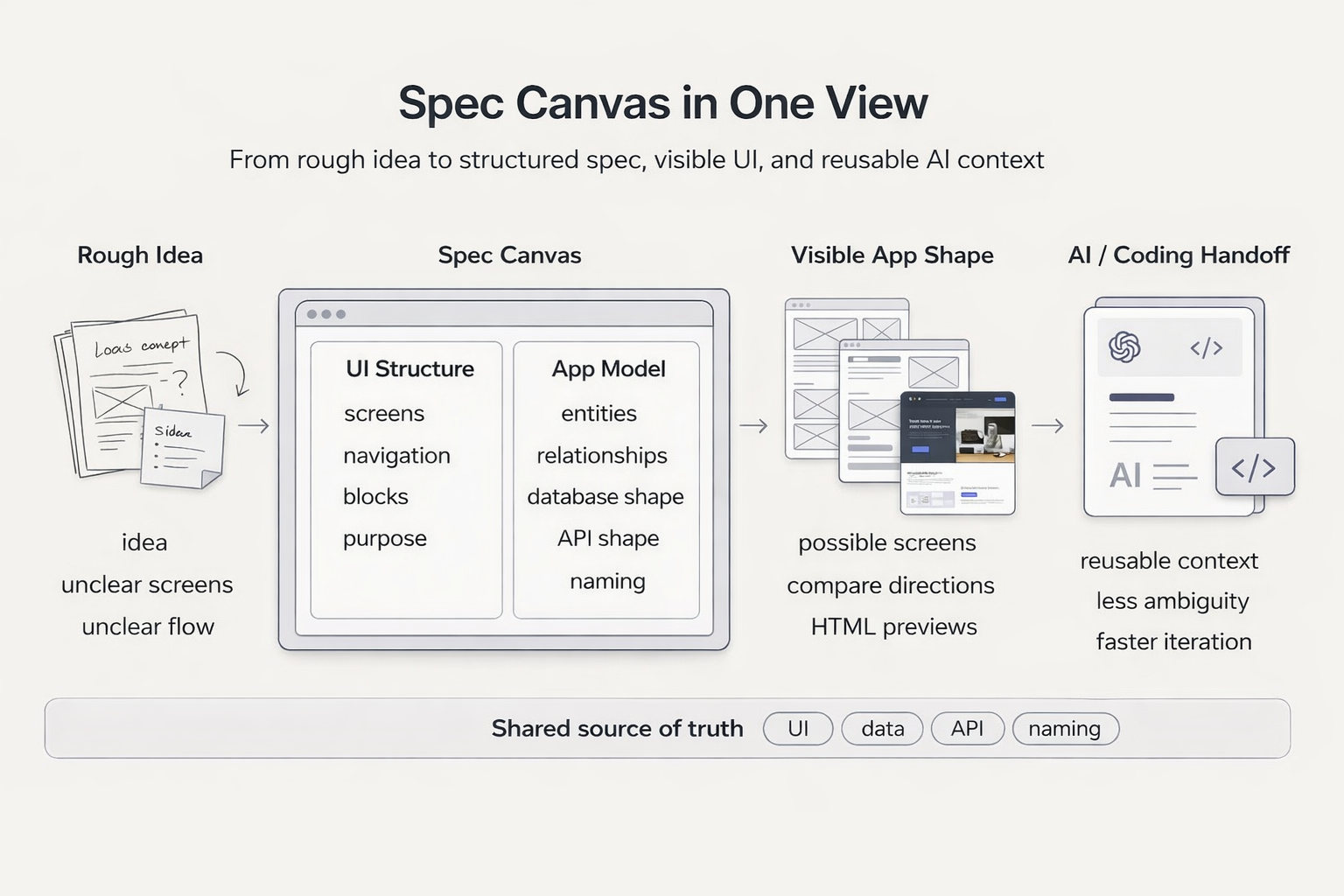
From rough idea to spec, visible UI, and reusable AI context.
From Rough Idea to Visible App Shape
Start with a vague product idea and use Spec Canvas to figure out what the app may actually need. That includes possible screens, what each screen should show, which blocks belong on each screen, and how the flow may work in practice. From there, the first structured spec can become realistic HTML implementations that are easier to evaluate than raw notes.
More Than UI
Spec Canvas is useful for screen structure, but it also helps describe the application model behind the interface. It can carry product intent, entities and relationships, the rough database and API shape, and the naming that keeps frontend and backend aligned.
Why this helps with AI
AI agents need more than screens. They also need stable context about entities, relationships, API boundaries, and naming. Spec Canvas preserves that context in reusable form instead of forcing the agent to reconstruct it from code and chat history each time.
Three Core Scenarios
- Explore a Rough Product Idea: make the first screens, blocks, and flow visible.
- Prepare Handoff to AI: package UI, app structure, and naming into reusable context.
- Reconstruct an Existing App: recover a usable spec from code, screenshots, and fragmented docs.
Start Here
First Project
A practical first workflow: create a spec, compare directions, refine it, and prepare a handoff with clearer app context.
How It Works
Understand the workflow behind Spec Canvas: formats, AI collaboration, and discovery.
Use Cases
See concrete workflows for exploration, AI handoff, and reconstructing an existing app.